~/blog/deploying-an-qt-application-on-windows.md
Deploying a Qt Application on Windows
The other day I created a simple widget-based application with Qt 5.2.1. Here is a summary of what I needed for deployment. The application should already be built in release mode. The required DLL files are in the following directories.
Qt5.2.1\5.2.1\msvc2012\bin
Qt5.2.1\5.2.1\msvc2012\bin\plugins
I ran the executable and kept adding DLLs based on the runtime errors that appeared. Along the way, I ran into the error below, and adding platforms/qwindow.dll did not solve it.
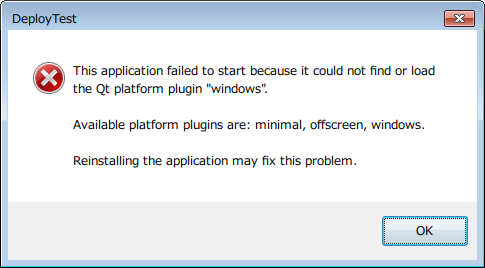
The root cause turned out to be that libEGL.dll was missing. After adding it, the error no longer occurred. The final folder structure looked like this.
*.exe
icudt51.dll
icuin51.dll
icuuc51.dll
libEGL.dll
libGLESv2.dll
Qt5Core.dll
Qt5Gui.dll
Qt5Widgets.dll
It worked even without platforms\qwindow.dll.