- Published on
Building OpenCV from Source
- Authors

- Name
- Daisuke Kobayashi
- https://twitter.com
If you want to use things like Intel IPP, Intel TBB, or CUDA, you need to build OpenCV from source.
For details, refer to the OpenCV Installation Guide.
What you need
CMake is a cross-platform build tool. It is useful to learn because it often comes up when building open-source software.
Download and install both CMake and OpenCV. By default, OpenCV is installed under C:/opencv.
Building with CMake
Normally, the build procedure differs depending on the compiler or IDE you use. For example, if you are in a gcc environment, building with make is common. If you are in a Visual C++ environment, it is common to use a solution file (.sln) or nmake. CMake absorbs those differences by generating makefiles or solution files from the CMake configuration files.
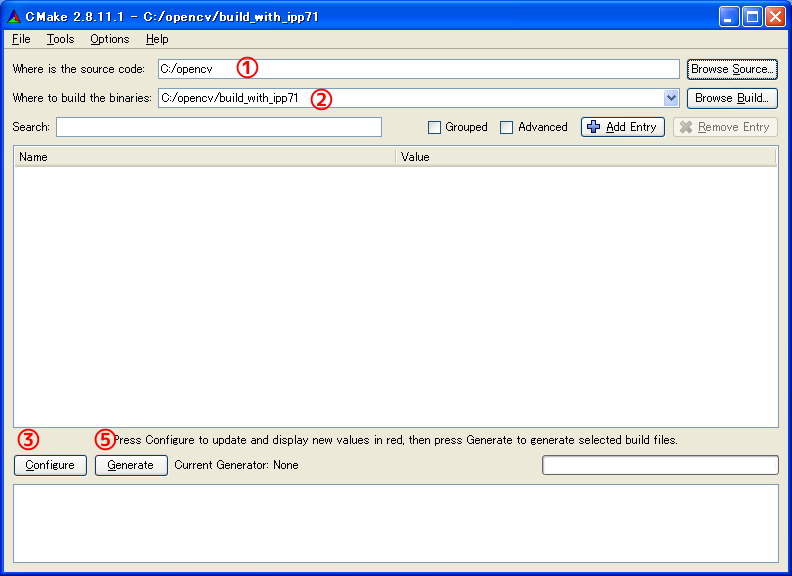
1. Specify the source folder
First specify the folder that contains the source code. If you point it to the folder that contains CMakeLists.txt, that is enough.
2. Specify the output folder
Specify the folder where the build files should be generated.
3. Configure
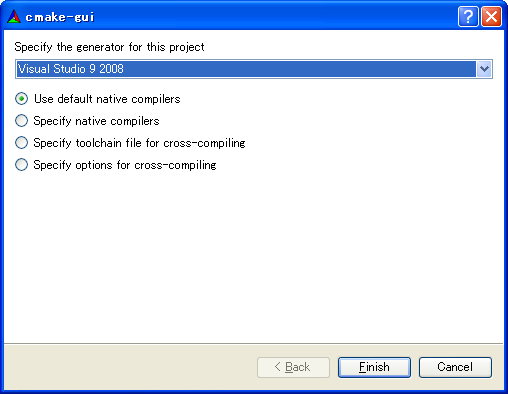
When you click the Configure button for the first time, a screen appears asking you to choose a compiler. It generates build files for the compiler you select there. Running Configure also checks the current environment and available dependencies.
4. Change settings
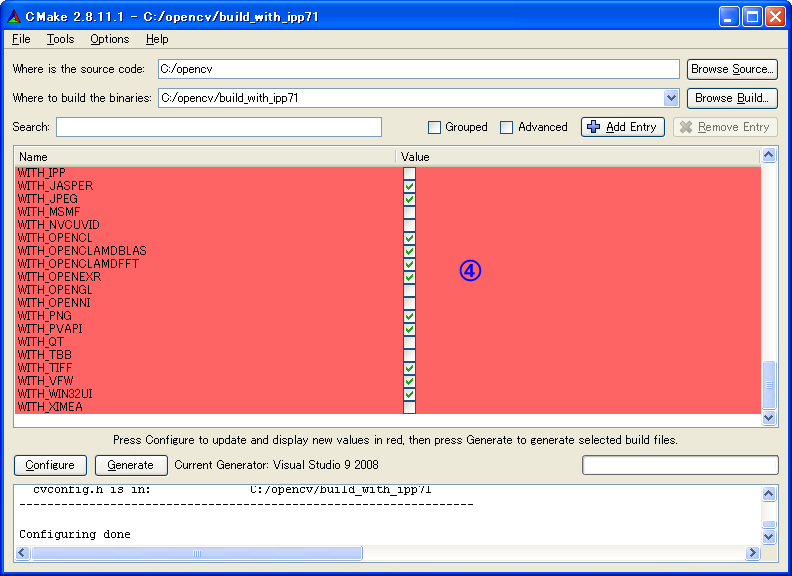
If you want to use IPP, check WITH_IPP and run Configure again. If IPP is installed in the standard location, it should be detected automatically, but if it is not, you need to specify the path manually. If you change any other options, repeat steps 3 and 4.
5. Generate the build files
Click the Generate button to produce the files needed for the build. If generation succeeds, the makefiles or solution files should be created in the folder you specified in step 2.
6. Build
If you selected Visual C++ as the compiler in a Windows environment, an OpenCV.sln file should have been generated in the output folder. Choose [Build] -> [Batch Build], check ALL_BUILD and INSTALL for Release, and then rebuild.