- Published on
Migrating an SVN Server to Another PC
- Authors

- Name
- Daisuke Kobayashi
- https://twitter.com
As part of a company-wide migration to Windows 7, I also migrated our SVN server. The old SVN server was running on Windows XP and was being retired, so I moved it to a new Windows 7 machine. These are my notes from that work.
SVN server configuration
Our team's SVN environment looked like this. We had an SVN server built with Apache 2.2 and Subversion 1.8, and we used svnsync to back it up periodically to an internal server. In parallel, we also backed it up to a NAS. The NAS was a Buffalo device, and we used the bundled Nas Navigator 2 software to synchronize folders. On top of that, an external HDD was connected to the NAS and used to back up the NAS data again. Besides the repositories, the NAS and the external HDD also stored other shared files.
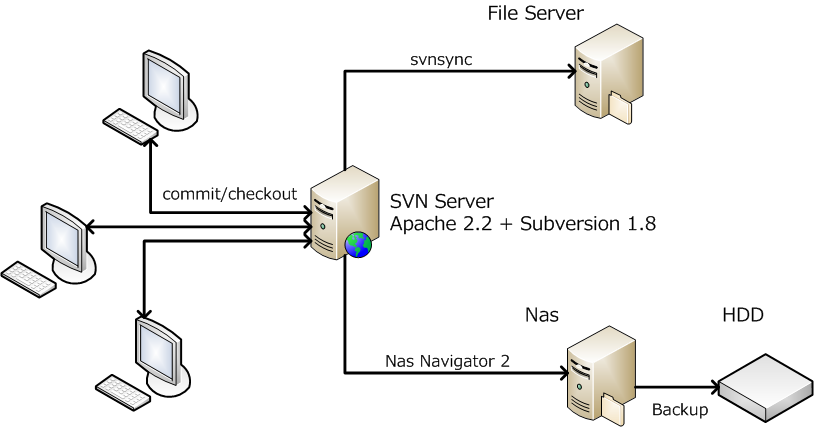
This post is about replacing the central SVN server in that setup with a new PC.
Installing Apache and Subversion
Install Apache and Subversion on the new Windows 7 machine. Download Apache HTTP Server from here and install it. I used 2.2 instead of 2.4 because the configuration format had changed in the 2.4 series and I wanted to minimize differences from the previous environment. It is also better to keep the installation directory the same as before if possible.
Next, download and install Subversion from here. There are various binary distributions of Subversion for Windows, so if you want a different one, choose from the list on this page.
Updating the configuration
Uncomment the following line:
LoadModule dav_module modules/mod_dav.so
Then add the following lines. Set the path to the folder where Subversion was installed.
LoadModule dav_svn_module "C:/svn/Subversion/bin/mod_dav_svn.so"
LoadModule authz_svn_module "C:/svn/Subversion/bin/mod_authz_svn.so"
Copy the Location section in httpd.conf from the old server. If the local repository path changes, update SVNPath.
<Location /repository/test-project>
    DAV svn
    SVNPath d:/svn/repository/test-project
    AuthType Basic
    AuthName "test project"
    AuthUserFile d:/svn/repository/test-project
    Require valid-user
</Location>
Migrating the repositories
I migrated the repositories with dump and load.
$ svnadmin dump /path/to/old/repository > /path/to/dump
On the destination PC, create the repository and load the dump.
$ svnadmin create /path/to/new/repository
$ svnadmin load /path/to/new/repository < /path/to/dump
For some repositories, the following error occurred during load. This seems to be related to the log-property encoding validation introduced in 1.6, where the line endings in the log message were not terminated with LF.
svnadmin: E125005: Invalid property value found in dumpstream; consider repairing the source or using --bypass-prop-validation while loading.
svnadmin: E125005: Cannot accept non-LF line endings in 'svn:log' property
When this happens, the repository load stops partway through. In that case, I re-ran dump starting from the point where loading had stopped and then re-ran load with the --bypass-prop-validation option. For example, if the latest revision was 150 and only up to 60 had been loaded, I used the following commands.
$ svnadmin dump /path/to/old/repository -r 61:150 --incremental > /path/to/dump
$ svnadmin load --bypass-prop-validation /path/to/new/repository < /path/to/dump
In this migration, the problem mainly occurred in older repositories. If you are loading multiple repositories at once from a batch file, be careful, because it can be easy to miss the fact that an error occurred in the middle. Alternatively, you may want to use --bypass-prop-validation from the start.
In my case I simply skipped the validation error, but the following article summarizes other ways to handle it.
svnsync is for backup
At first, I thought I might be able to do the migration with svnsync, but svnsync is really meant for synchronization as a backup mechanism. If you connect the destination PC to the network above, commit to the repository you want to migrate on the destination, and then try to svnsync that repository to the file server, you get an error like this.
svnsync: E000022: Destination HEAD (101) is not the last merged revision (100); did you commit to the destination repository without using svnsync?
Backing up the repositories
We back up the repositories to an internal file server using svnsync, but because the server URL changes, the synchronization settings also need to be updated. It seems possible to change only the URL, but when I tried that on Windows using the method below, it did not work well, so this time I deleted everything and synchronized again from scratch.
- Stack Overflow: How to change svn url in svnsync?
- When switching the original repository while mirroring with
svnsync
Creating the repositories
Create the repository on the synchronization destination.
mkdir repository
mkdir "repository/test-project"
svnadmin create "repository/test-project"
COPY pre-revprop-change.bat "repository/test-project"
The contents of pre-revprop-change.bat are as follows.
exit 0
Configuring the synchronization source
svnsync init --username syncuser --password syncuser --no-auth-cache file:///D:/svn/repository/test-project http://svnserver-old/repository/test-project
Synchronizing the repository
svnsync sync --username syncuser --password syncuser --no-auth-cache file:///D:/svn/repository/test-project